


Peptide Calculator App
4.3129.00 Reviews
App Specs
- Version
- 2.0.6
- Updated On
- License
- Free
- Downloads
- 10,000+
- Developer
- Monarca L.L.C-FZ
- Categories
- Medical
- Platform
- Android
Screenshots
 Analysis by AppCompare
When I need to check a peptide sequence, the useful question is not just whether I can get a number quickly; it is whether I can move from a sequence to a result I can responsibly use without losing track of what I entered. Peptide Calculator is aimed at that narrow, practical moment. It is a medical-category app from Monarca L.L.C-FZ, and its focus on peptide calculations makes it more specialized than a general calculator. I see it as a convenient helper for checking information, not a substitute for scientific judgment, validated laboratory software, or a protocol reviewed by a qualified professional.
Starting with a sequence, not a blank calculator
The first decision is what you want the app to do for you. If you already have a peptide sequence and need a quick calculation, a purpose-built tool can feel much more direct than opening a spreadsheet and rebuilding formulas. If you are still deciding what sequence to use, however, a calculator will not make that scientific choice for you. I would treat it as a step in a workflow: prepare the sequence from a trusted source, enter it carefully, inspect the output, then pass the result along with enough context for someone else to check it.
That distinction matters because a small input mistake can make a neat-looking answer misleading. Before calculating, I would compare the sequence character by character with the source and check that the intended format is being used. This is an easy habit to skip when working quickly, especially after copying text between a paper, a notes app, and a phone. A dedicated calculator reduces arithmetic friction, but it cannot tell you that the sequence you supplied was the wrong one for your experiment.
Moving from input to a usable result
The app’s central job is peptide calculation, so the most useful way to approach it is one result at a time. Enter the sequence, request the property you need, and treat the displayed value as a calculated reference that still needs interpretation. A molecular-weight figure, for example, can help with planning or checking notes, but it does not by itself confirm the identity, purity, concentration, or suitability of a physical sample. Keeping those distinctions clear is part of using any calculator well.
For a practical handoff, I would record the exact sequence beside the value rather than copying a result alone into a message or lab notebook. If another person receives only a number, they may not know which sequence or assumptions produced it. A useful routine is to preserve the input, the requested property, and the result together, then verify the important calculation independently when it will guide a consequential decision. That small bit of context makes a quick phone lookup more useful later.
Where it fits beside other tools
Compared with doing the arithmetic manually, a peptide-focused calculator can save repeated setup and reduce the chance of a transcription or formula slip. Compared with a spreadsheet, it may be faster when the task is a one-off check, while a spreadsheet can be better when you need a custom audit trail, shared project records, or several calculations arranged side by side. A specialist desktop or laboratory package may be the stronger choice for a validated, documented workflow. I would pick the app for convenience, not assume it replaces those more controlled tools.
That trade-off is especially relevant for students and researchers who move between a bench, a meeting, and a computer. A phone can be handy when a colleague asks for a quick estimate and the laptop is not nearby. But if the calculation will feed into a formal report, a regulated process, or a decision where traceability matters, I would move the work into the approved system and document how the result was checked. Quick access is valuable; it is not the same as formal verification.
Worth Reading Before You Choose

Flipboard Shows What News Apps Must Do Beyond the Feed

Switching to Android Auto Means Rethinking Your Driving Routine

Google Calendar Makes a Crowded Week Easier to Manage

Ludo King Makes the Most of the Minutes Between Plans

Baby Panda World Brings Quick Play to Modern Phones, but Its Game Library Feels Busy

ESPN’s Live Game View Makes Following Close Games Easier
Who is likely to find it useful
I can see this being a good fit for someone who already understands peptide notation and wants a focused calculation tool close at hand. It may also help a learner follow a calculation alongside teaching materials, provided they use the app to check their understanding rather than treat every output as an unexplained answer. The strongest everyday use case is modest: you are reviewing a sequence before a discussion, want to check a property, and need a fast reference before returning to your main notes.
On the other hand, I would steer a complete beginner toward learning what each property means before relying on any peptide calculator. I would also skip this as a primary tool if my work required a carefully versioned record, team-wide review, or a documented method that an auditor or supervisor could reproduce. In those situations, a validated platform or a controlled spreadsheet may be a better fit, even if it takes longer to open and use.
Small habits that prevent avoidable errors
One useful habit is to calculate from a clean copy of the sequence rather than editing it while entering it. I would keep a source copy untouched, remove only formatting that the tool does not accept, and compare the final input with the original before trusting the result. If I am checking several related sequences, I would handle them one at a time and label each result immediately. That may seem slower than entering a batch from memory, but it makes it much easier to spot a swapped or duplicated sequence.
Another sensible step is to separate a quick estimate from a decision. A calculated property can inform a discussion, but a real-world preparation may involve conditions and sample details outside the calculation itself. I would avoid turning an app output directly into a laboratory instruction without checking the relevant protocol and getting the appropriate review. The app is most useful when it removes routine calculation work while leaving scientific interpretation where it belongs.
Getting Started with Peptide Calculator
First things first, downloading the app is a breeze. Available on both Android and iOS, you can find it in your respective app store. Once installed, the Peptide Calculator App greets you with a clean and intuitive interface. The developers have clearly put thought into making the user experience as smooth as possible, which is always a plus in my book.
Features That Stand Out
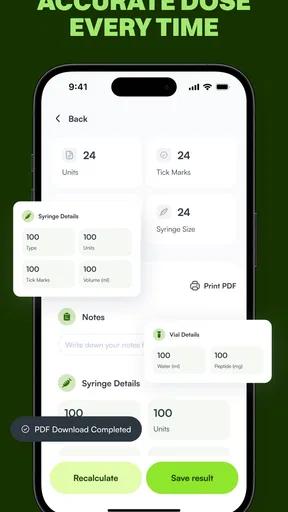
Now, let's talk about the features. At its core, this app is all about calculations. Its primary function is to help you calculate peptide properties such as molecular weight, extinction coefficient, and isoelectric point. It’s like having a mini lab assistant right in your pocket. What I love is how comprehensive it is while remaining user-friendly.
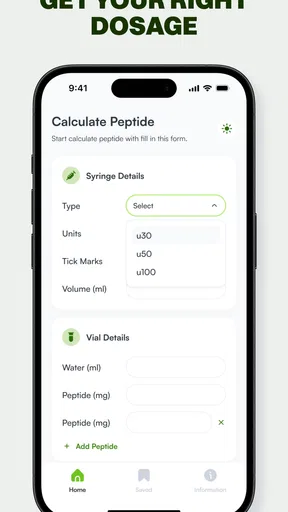
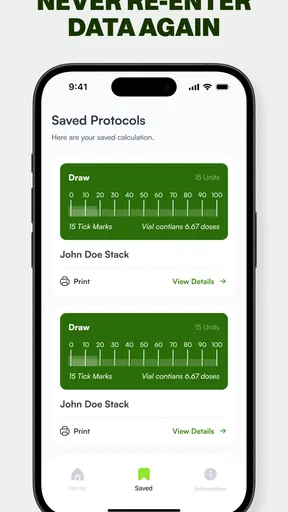
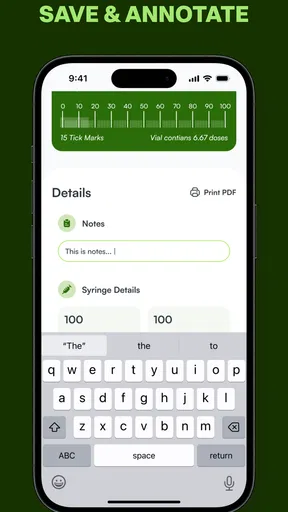
The app also allows you to input sequences easily. You can either type them directly or import them from a file. This flexibility is a game-changer, especially when you're dealing with complex sequences. I found the ability to save and revisit previous calculations incredibly helpful, making it easy to manage multiple projects simultaneously.
User-Friendly Experience
One of the standout aspects of this app is its user interface. The developers have nailed the balance between functionality and simplicity. There are no unnecessary frills—just straightforward, useful features. The color scheme is easy on the eyes, which is something I always appreciate in an app that I might be staring at for hours.
Another thing worth mentioning is the app’s performance. I didn’t experience any lag or crashes, even when inputting large sequences. This reliability is crucial, especially when you're on a tight deadline and can't afford to lose your work.
How It Fits Into Your Workflow
Incorporating the app into your daily routine is seamless. Whether you're in the lab or on the go, you can quickly pull up the app and perform your calculations in real-time. I found it particularly handy during meetings when I needed quick access to peptide data without having to bring my laptop along.
The app also includes a handy help section and FAQ for those moments when you need a little extra guidance. It's like having a user manual right at your fingertips, ensuring that even beginners can make the most of the app's features.
What to know before relying on it
The app is free to install, with optional in-app purchases priced from $4.99 to $9.99 per item. Its age rating is Everyone, and the current version is 2.0.6. It has a 4.5 average from around 1.6 thousand ratings, with over 10 thousand installs. Those figures suggest that it has found an audience, but they are not a scientific validation of its calculations; I would still check important outputs against a trusted method.
A common question is whether this can replace a desktop tool. For a quick calculation or a personal cross-check, a phone app can be more convenient. For shared work that needs reproducible records or custom documentation, I would use whichever validated system my team relies on and keep the phone app in a supporting role. Another practical question is whether someone new to peptides can use it: they may be able to enter a sequence, but understanding the output still requires some background, so I would pair it with reliable learning material rather than guess at what a value means.
Platform support is also worth checking before building a routine around it. The minimum operating-system requirement is version 7.0, so I would make sure the device meets that requirement and that the app is available through the appropriate store before planning to use it during a lab session. The developer, Monarca L.L.C-FZ, provides the app as a focused utility; for my own work, I would keep the original sequence and any consequential calculation in my normal records rather than relying on a phone history as the sole archive.
Final Thoughts
Overall, the Peptide Calculator App is a must-have for anyone working with peptides. Its ease of use, coupled with its robust functionality, makes it an indispensable tool in the scientific community. Whether you’re calculating complex peptide sequences or simply need a reliable tool for quick calculations, this app has got you covered.
If you’re intrigued and want to give it a try, head over to your app store and download it today. Trust me, once you start using it, you'll wonder how you ever managed without it!
My recommendation after weighing the trade-offs
I would recommend giving it a place in a toolkit if peptide calculations come up often and a quick mobile check would genuinely save time. I would not make it the only record of a result or treat convenience as proof of correctness. For everyday reference, the focused approach is the appeal; for formal work, careful checking and a traceable process matter more than speed.
Pros
- Easy-to-use interface for quick calculations.
- Supports a wide range of peptide sequences.
- Provides detailed calculation results.
- Offline functionality ensures accessibility.
- Regular updates improve app stability.
Cons
- Limited customization options for calculations.
- No cloud backup for user data.
- Occasional minor bugs in newer updates.
- Lacks integration with other health apps.
- No dark mode for nighttime use.
FAQs for Peptide Calculator App
What does the Peptide Calculator App do?
The Peptide Calculator App is designed to help researchers, students, and professionals in the field of biochemistry and molecular biology calculate the molecular weight and concentration of peptides. It streamlines complex calculations, offering an intuitive interface for accurate and quick results, ultimately saving time and reducing potential errors.
Is the Peptide Calculator App user-friendly for beginners?
Yes, the Peptide Calculator App is designed with a user-friendly interface that caters to both beginners and experienced users. It features clear instructions and tutorials to help new users navigate the app effectively and perform complex calculations with ease, making it accessible to a broad audience.
Can the Peptide Calculator App handle custom peptide sequences?
Absolutely! The Peptide Calculator App allows users to input custom peptide sequences for analysis. This flexibility is crucial for researchers working with unique or novel peptides, providing them with the ability to calculate molecular weights and concentrations for their specific needs seamlessly.
Does the Peptide Calculator App require an internet connection?
No, the Peptide Calculator App operates offline, allowing users to perform peptide calculations without needing an internet connection. This feature is particularly beneficial for researchers who work in labs or areas with limited internet access, ensuring consistent functionality at all times.
Is the Peptide Calculator App available on both Android and iOS?
Yes, the Peptide Calculator App is available on both Android and iOS platforms. This cross-platform availability ensures that users can access the app on their preferred devices, whether they are using a smartphone or a tablet, providing flexibility and convenience for all users.


